Why Stealth Browsers Still Get Detected
Introduction
If you’ve spent any time around browser automation, you’ve heard some version of this pitch:
“Just use a stealth browser. It patches the fingerprints. You’re good.”
Then someone wires up Playwright or Puppeteer, flips on the stealth plugins (or buys an anti-detect build), and still gets blocked. Or worse: they get a soft pass once, celebrate, and die on the real checkout / login / inventory call.
Here’s the part that gets skipped in most tutorials. Modern detection is not a single checkbox for navigator.webdriver. It’s closer to scoring whether your browser process, JavaScript environment, network identity, and session story all look like the same real client over time.
Stealth browsers can help with one slice of that. They are not a new human.
This post is product-agnostic. No “use tool X to pass site Y.” Just the model I use when thinking about browsers, TLS, and why “advanced stealth” still fails.
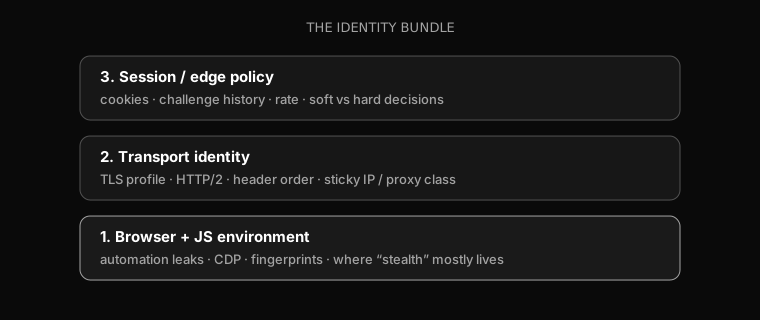
The identity bundle
People like to talk about “the fingerprint.” In practice, high-end bot defense scores a bundle.
| Layer | What gets looked at | What stealth usually does |
|---|---|---|
| Browser + JS | webdriver, CDP, chrome objects, canvas/WebGL, fonts, permissions | Patches a lot of this |
| Transport | TLS profile, HTTP/2 settings, header order, ALPN | Helps only if you use a real browser stack |
| Network | IP / ASN, residential vs datacenter, stickiness | Usually outside the browser product |
| Session | cookies, challenges, timing, reuse across hops | Policy and ops, not a stealth flag |
| Coherence | Do UA, JS, TLS, and IP tell the same story? | Where “advanced stealth” often dies |
That last row is the one people underweight. You can look “human” in DevTools and still look wrong on the wire.
The lie vs a better model// the lie
const identity = { stealthBrowser: true };
// closer to reality
const identity = {
jsEnv: { webdriver: false, chromeRuntime: "patched?" },
tls: { profile: "chrome_family", h2: "browser-like?" },
network: { ipClass: "residential|dc", sticky: true },
session: { cookies: "...", challenges: [] },
coherent: false, // this is often what actually fails
};
What stealth browsers actually fix
Be fair. Stealth exists for a reason, and it is not pure marketing.
Compared with raw Selenium or stock Playwright, a better automation stack often:
- Hides obvious automation properties (
navigator.webdriver, common runtime leaks) - Reduces Chrome DevTools Protocol side-channel tells
- Ships less “empty lab machine” defaults than a default headless profile
- Uses a real Chromium or Firefox family binary, which usually means native browser TLS instead of a random HTTP library pretending to be Chrome
That last point matters. A lot of “undetected” failures are not stealth failures at all. They are requests + fake JA3 failures. Switching from a pure HTTP client to a real browser stack can look like magic when the real upgrade was transport, not the fingerprint patch list.
Useful distinction: stealth can improve environment cleanliness. It does not automatically fix IP reputation, session stickiness, or hard-target policy.
Why they still get detected
1. Automation is a process, not a property
Even if navigator.webdriver === false, you are still driving a browser with software.
Common residual tells (not a complete list, and not a recipe):
- CDP / DevTools control paths and launch flags
- Missing human-ish device noise (media devices, permissions prompts, plugin surfaces)
- Profiles that are too clean, too identical, or recycled at scale
- Hardware and graphics strings that never show up in normal user populations
In other words: patching the famous boolean is necessary in 2019-era demos. It is not sufficient against anything that scores distributions and incoherence.
Patching one flag is not an identity// pedagogical only
Object.defineProperty(navigator, "webdriver", {
get: () => false,
});
// detection that only checks this is weak
// detection that scores the whole environment still has plenty to work with
2. JS fingerprint is not TLS identity
This is the classic failure mode I see over and over:
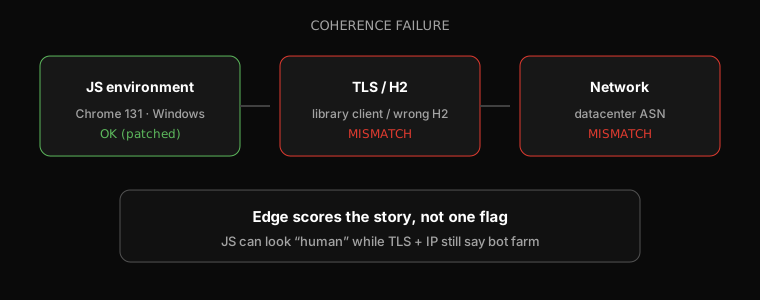
const story = {
  userAgent: "Chrome/131 Windows",
  jsEngine: "Chromium-like",
  tlsProfile: "not-chrome-family", // library client, wrong H2, etc.
  ipClass: "datacenter",
};

function looksCoherent(s) {
  // simplified: real systems use many more signals
  const uaChrome = /Chrome\//.test(s.userAgent);
  const tlsChrome = s.tlsProfile === "chrome-family";
  const netOk = s.ipClass === "residential" || s.ipClass === "mobile";
  return uaChrome && tlsChrome && netOk;
}

looksCoherent(story); // false
A stealth browser running real Chrome helps the TLS story. A stealth browser sitting behind the wrong egress, or mixed with a second HTTP client for “API speed,” often reintroduces the mismatch.
Header order and HTTP/2 settings are part of this too. Browsers are picky about how they speak HTTP. Many non-browser clients are not.
3. Behavior and session still exist
Even a perfect environment loses if the session is weird.
- Forms filled in zero milliseconds with zero pointer noise
- New cookie jar every request
- Challenge completed on IP A, follow-up on IP B
- Soft path accepts telemetry, protected business path still returns 403
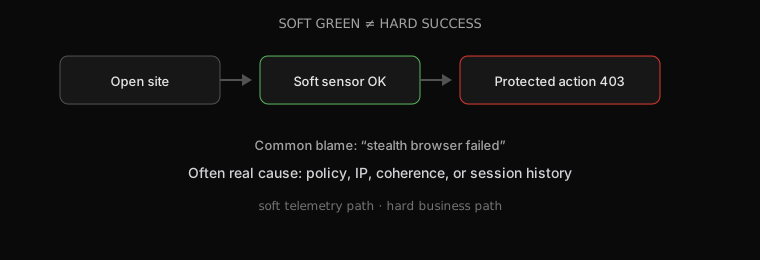
This is where people say “stealth got detected” when the real sentence is “policy did not like this session.” Same browser build can soft-pass on a low-risk path and fail on a high-risk path. That is not mysterious. That is how edge systems are designed.
4. Arms race, plus scale
Stealth is an arms race product category. Detection updates. Browser patches lag. A build that was quiet last month is a pin in time, not a permanent identity.
That should sound familiar if you read my post on client-side VM antibots. Client programs rotate. Browser detection surfaces also move. Anything you amortize forever eventually dies.
Then there’s scale:
| Demo | Production-shaped reality |
|---|---|
| One clean local session | Hundreds of sessions, same ASN |
| One hardware profile | Identical “unique” devices at volume |
| Manual clicks once | Scripted paths with shared timing fingerprints |
| Fresh residential IP once | Burned ranges + reuse patterns |
Demos pass. Farms fail. Recruiters and defenders both care about that difference.
A simple failure table
When something “gets detected,” I try to classify it before I touch the browser build.
| Failure class | Looks like | Often blamed on | Often actually |
|---|---|---|---|
| Env leak | Instant bot page / hard challenge | “Bad stealth” | webdriver / CDP / runtime leaks |
| Transport mismatch | Soft never greens | “Sensor broken” | TLS / H2 / header order |
| IP reputation | Everything is harsh | “Browser detected” | DC proxy / burned ASN |
| Coherence break | Random soft/hard | “Antibot RNG” | UA / TLS / IP / session disagree |
| Policy | Soft OK, action blocked | “Need better stealth” | Hard target + history + risk |
Rule of thumb: if soft telemetry works and the business action fails, stop rewriting stealth patches. Start inspecting session, IP, and path policy.
How to think about testing (authorized work)
If you test bot defense on systems you own or are allowed to test, change one layer at a time.
Lab log shape (placeholders)const attempt = {
browser: "chromium-family-build",
jsPatches: ["webdriver-hidden", "..."],
tlsProfile: "chrome_family",
ip: { class: "residential", sticky: true },
path: "soft-sensor then protected-action",
result: {
soft: "accept|challenge|block",
hard: "200|403|challenge",
},
};
// good science: vary TLS or IP or path, not all three at once
// bad science: swap stealth vendor, proxy, and script in one run
Log TLS profile, IP class, UA, cookie state, and challenge path together. Never call a single soft green a complete reverse of the system. Soft greens are operational data. Hard targets and sustained scale are a different game.
Takeaways
Stealth browsers still get detected because detection stopped being “find webdriver” a long time ago.
You can patch the environment and still fail the story. TLS, IP, session history, and coherence are part of that story. Soft green is not hard success.
If you liked the systems framing here, pair it with Client-Side Virtual Machines in Modern Bot Defense (Part 1). That post is about why the client program got harder. This one is about why the browser product was never a free pass.
Hope this mental model helps next time someone says “just enable stealth.”
Related: VM antibots Part 1 · nate.log